If you are wondering how to use a mobile proxy on Android, the short answer is this: Android allows you to configure a proxy server at the WiFi or mobile network level, or through dedicated Android proxy applications, enabling you to route traffic through a mobile IP for privacy, geo-targeting, app testing, social media management, and data collection. By correctly configuring android proxy settings, choosing a reliable proxy server for Android, and understanding common pitfalls, you can safely and efficiently use a proxy for Android mobile without rooting your device.
In this article, we will walk you step by step through how to set up proxy on Android, explain different proxy types, compare free vs paid solutions, and show real-world use cases.
By the end, you will know how to get a proxy IP address on Android, how to configure android mobile proxy settings for Wi Fi and mobile networks, and why premium providers like okkproxy offer better stability, security, and compliance than free proxy servers.
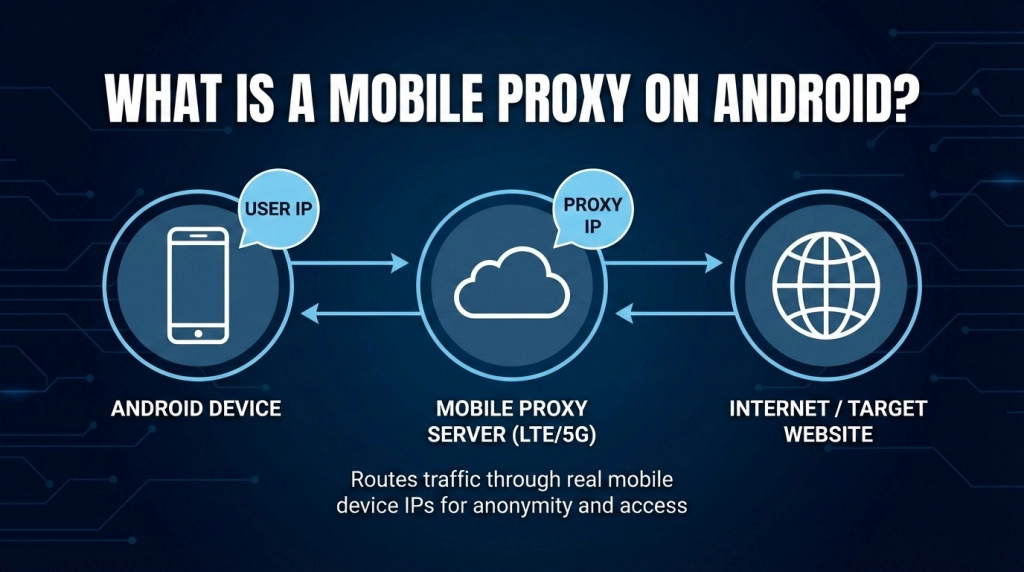
What Is a Mobile Proxy on Android?
A mobile proxy on Android routes your device’s internet traffic through a mobile IP address assigned by a real cellular carrier (3G/4G/5G). Mobile proxies rotate naturally and are trusted by most platforms.
Why Use a Proxy on Android?
- Privacy protection and IP masking
- Access to geo-restricted apps or content
- Social media account management
- Ad verification and mobile app testing
- Market research and web scraping
- Avoiding IP bans and rate limits
Using a proxy server in Android ensures that apps and browsers see the proxy IP instead of your real one.
Types of Proxies Supported on Android
| Proxy Type | Description | Best Use Case |
| HTTP Proxy | Handles standard web traffic | Browsing, light scraping |
| HTTPS Proxy | Encrypted web traffic | Secure browsing |
| SOCKS5 Proxy | Supports all traffic types | Apps, games, messengers |
| Mobile Proxy | Uses carrier IPs | Social media, ads |
| Free Proxy | Public shared IPs | Testing only (not recommended) |
How to Get a Proxy IP Address on Android?
Before learning how to use a proxy in Android phone, you need a proxy IP.
Options to Get a Proxy IP
- Free proxy server for Android (limited, risky)
- VPN apps with proxy features
- Paid proxy providers (recommended)
Why Choose okkproxy?
OkkProxy provides:
- Real mobile IPs (4G/5G)
- Global location coverage
- High uptime and speed
- Ethical IP sourcing
- Easy integration with Android proxy software
This makes OkkProxy a reliable proxy server Android solution for both individuals and businesses.
How to Set Up Proxy on Android (Wi-Fi Network)
This is the most common android setup proxy method.
Step-by-Step: Configure Proxy on Android Wi‑Fi
- Open Settings → Wi‑Fi
- Long-press your connected network
- Tap Modify network
- Select Advanced options
- Set Proxy to Manual
- Enter proxy host name and port
- Save settings
This completes proxy settings in Android for Wi‑Fi.
How to Set Proxy in Android Mobile Network (APN Method)
For android proxy settings mobile network, you must configure APN.
Steps to Configure Proxy on Android Mobile Network
- Go to Settings → Mobile Network
- Select Access Point Names (APN)
- Edit your active APN
- Enter proxy IP and port
- Save and restart data
Note: Not all carriers allow mobile network proxy configuration.
How to Use a Proxy Server on Android via Apps
If you don’t want system-level settings, use an android proxy application.
Popular Android Proxy Software
- ProxyDroid (advanced users)
- Postern
- Shadowrocket (SOCKS5)
- Custom apps from proxy providers
OkkProxy supports SOCKS5 and HTTP protocols compatible with most proxy apps.
Android Proxy Server Settings Explained
| Setting | Meaning |
| Proxy Host | IP or domain |
| Proxy Port | Communication port |
| Username | Authentication ID |
| Password | Authentication key |
| Bypass List | Domains excluded |
How to Use Charles Proxy on Android (Advanced)
Charles is used for debugging and traffic inspection.
Android Charles Proxy Certificate Setup
- Install Charles on your PC
- Set Android Wi‑Fi proxy to PC IP
- Download Charles certificate
- Install as User Certificate
- Trust certificate for VPN/apps
This method is essential for developers and QA engineers.
Free Proxy for Android: Is It Worth It?
Pros
- No cost
- Easy access
Cons
- Slow speed
- High ban rate
- Security risks
- No support
A free proxy server for Android may work temporarily but is not suitable for professional tasks.
Paid Mobile Proxy vs Free Proxy (Comparison)
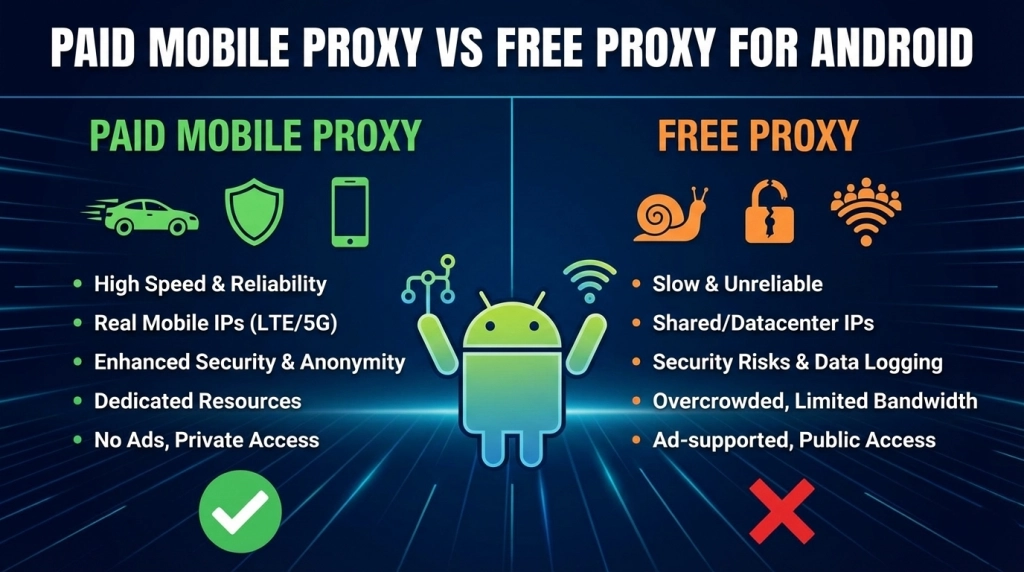
| Feature | Free Proxy | okkproxy Mobile Proxy |
| Speed | Low | High |
| Stability | Unstable | 99%+ uptime |
| Security | Risky | Encrypted |
| IP Quality | Shared | Real carrier IP |
| Support | None | 24/7 |
Common Issues and Troubleshooting
Proxy Not Working?
- Check IP and port
- Verify authentication
- Disable VPN conflicts
- Restart network
App Bypasses Proxy?
Some apps ignore system proxy. Use SOCKS5 apps or proxy modes from providers like Okkproxy.
Best Practices for Using Proxy on Android
- Avoid public Wi‑Fi with free proxies
- Rotate IPs responsibly
- Match proxy location to task
- Use HTTPS/SOCKS5
- Choose compliant providers
These practices improve safety and performance.
FAQs
How to use proxy in Android safely?
Use paid mobile proxies, HTTPS or SOCKS5, and avoid unknown free servers.
Can I set proxy without root?
Yes. Android allows proxy setup Android without root via Wi‑Fi or apps.
Does proxy affect all apps?
Not always. Some apps require SOCKS5 or VPN‑based proxy modes.
What is the best proxy for Android mobile?
A mobile proxy from okkproxy offers the best balance of trust, speed, and compatibility.
Conclusion
Learning how to use a mobile proxy on Android is no longer complicated. Whether you configure android proxy settings manually, use an android proxy application, or integrate advanced tools like Charles, Android offers flexible options. However, the quality of your proxy determines success.
Free solutions often fail, while premium services like okkproxy provide reliable android mobile proxy infrastructure for privacy, business, and development needs. By following this guide, you can confidently set up, optimize, and scale proxy usage on Android the right way.
