
In today’s era of strict online risk control, especially for cross-border eCommerce, social media account management, ad campaigns, and data scraping, issues like IP bans, blocked access, or frequent CAPTCHAs can seriously disrupt workflows.
Using high-quality residential proxies has become the most effective way to avoid detection and maintain stable connections.
Combining residential proxies with a Bit Fingerprint Browser has become a practical and widely adopted solution.
What is Bit Fingerprint Browser?
The Bit Fingerprint Browser is a professional tool that can simulate unique browser fingerprints for each account.
It includes elements like:
- User-Agent
- Language settings
- Plugins
- Screen resolution
This allows multiple accounts to operate on the same device while avoiding platform detection and association, greatly improving account security.
However, using only a fingerprint browser may still trigger restrictions if the IP itself is problematic.
For example, excessive activity from the same IP may lead to CAPTCHAs, throttling, or even account bans.
Why Combine with Residential Proxies?
Residential proxies provide IP addresses from real home broadband networks. Unlike traditional datacenter proxies, they mimic normal user traffic, making it harder for platforms to detect automated activity.
Key Benefits:
- Reduced ban risk: Residential IPs are harder to flag as bots or bulk login activity.
- Stable access: Diverse IPs allow smooth rotation for long-term tasks.
- Geographically precise access: Switch between countries/regions for cross-border account access and market research.
- Enhanced security: Combining device fingerprint + IP location creates double-layer protection.
Practical Use Cases
1. Multi-Region Login for Overseas Accounts
Simulate different device fingerprints with Bit Fingerprint Browser and log in via residential IPs from multiple countries.
- Avoids risk detection
- Bypasses geo-restrictions
2. Regional Ad Testing
Test ads in different countries using residential proxies for location switching. Combine with browser fingerprints to simulate local devices, ensuring accurate impressions.
3. Cross-Border Price & Content Scraping
Use the fingerprint browser to simulate environment differences and residential proxies for regional access.
- Collect data from multiple regions simultaneously
- Improve accuracy and efficiency
Step-by-Step: Configuring Bit Fingerprint Browser with OKKProxy
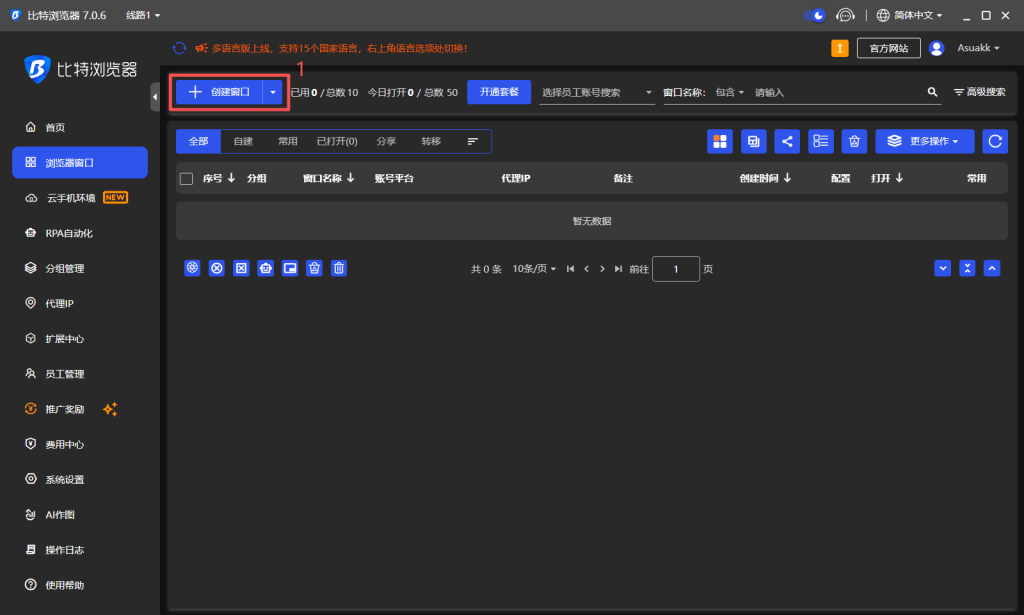
1.Launch Bit Fingerprint Browser and register. Click Create Window (1).
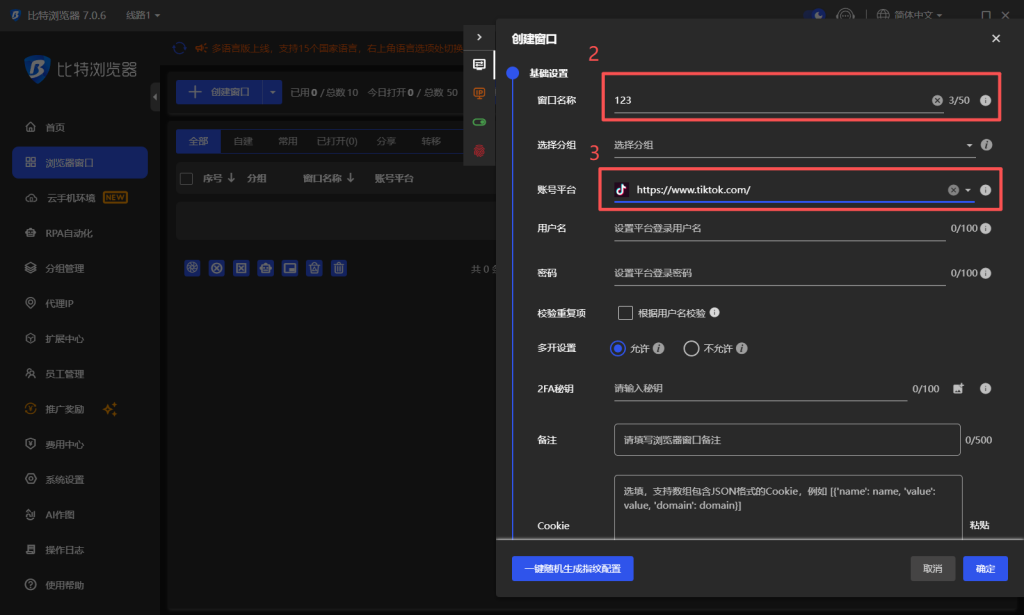
2.Enter window name (2) and select your account platform (3).
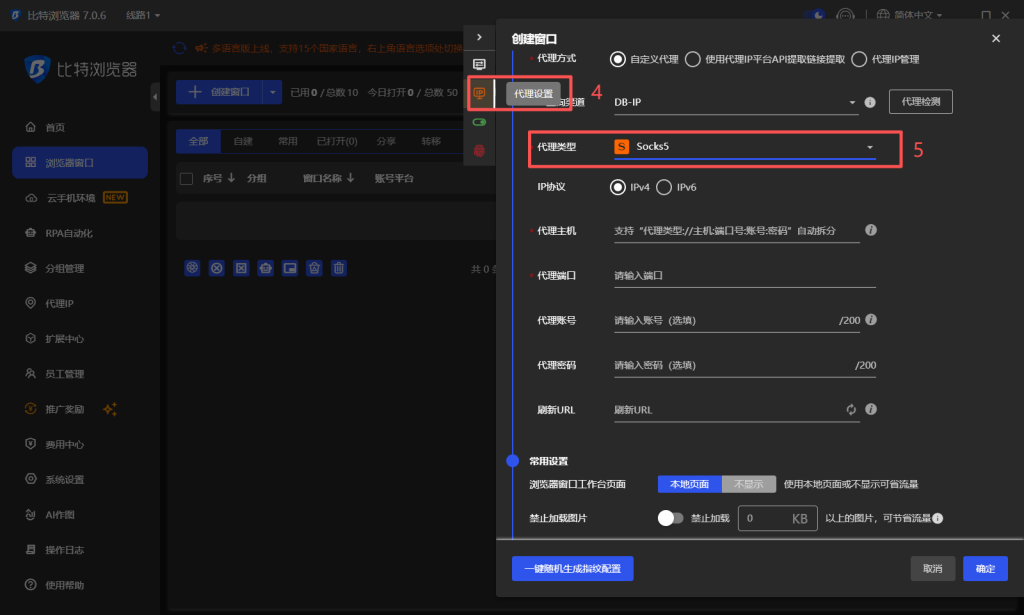
3.Go to Proxy Settings (4) and select Socks5 (5).
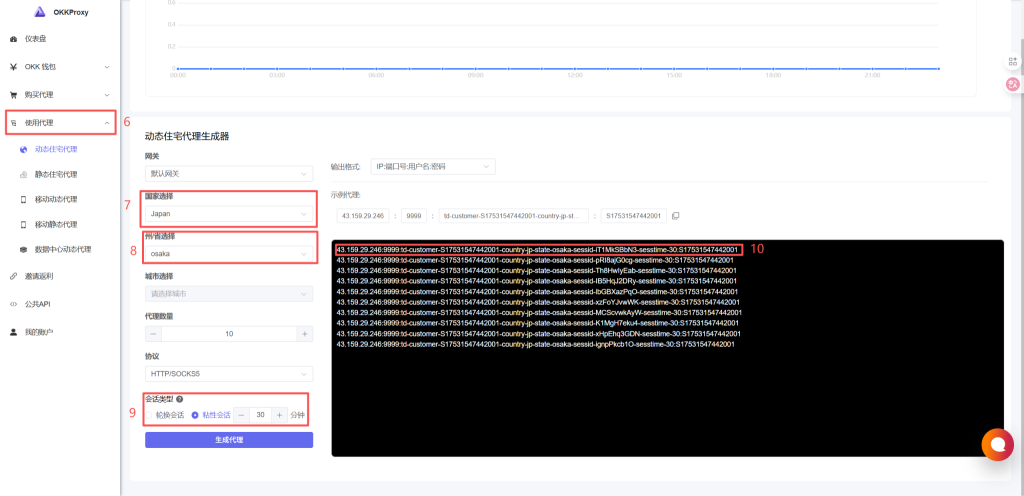
4.In OKKProxy dashboard, generate the proxy: choose type (6), country (7), state/province (8), and set session rotation or sticky session (9). Copy the proxy (10) back into the browser.
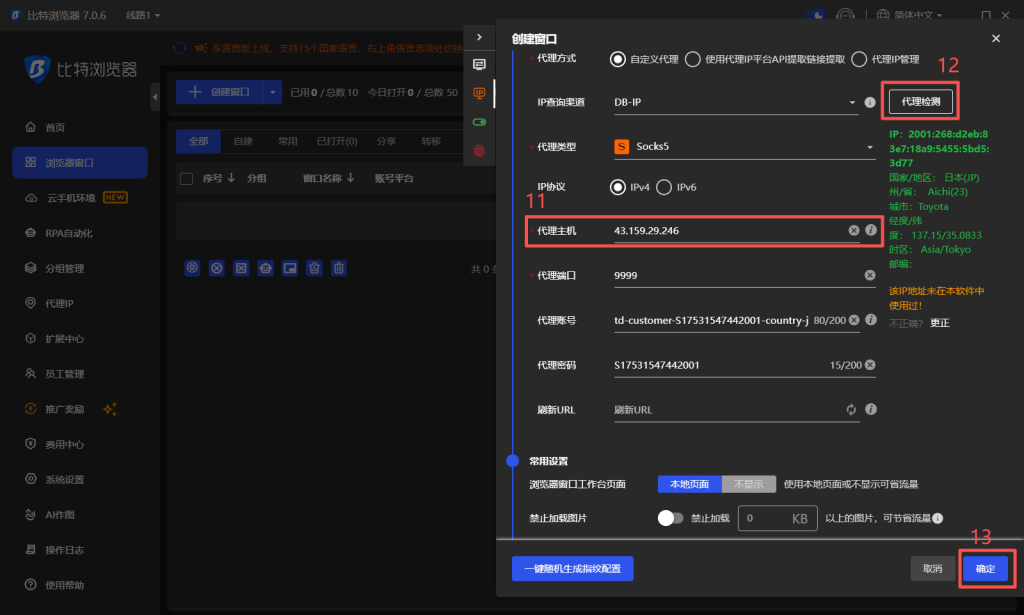
5.Paste the proxy into the browser (11), which will auto-fill the rest. Click Test Connection (12), then Confirm (13) after success.
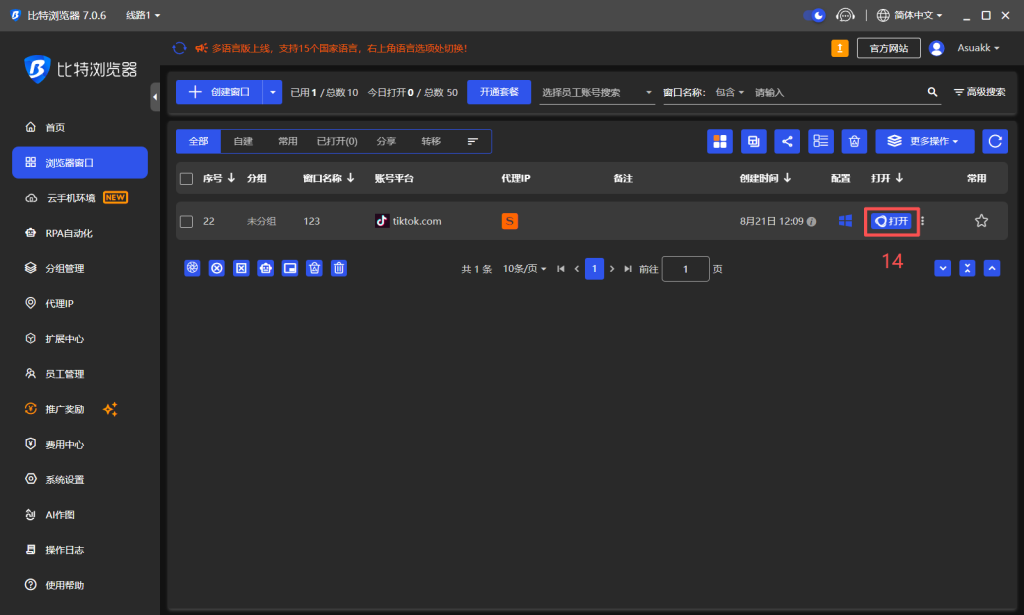
6.Click Start Window (14) to launch the session.
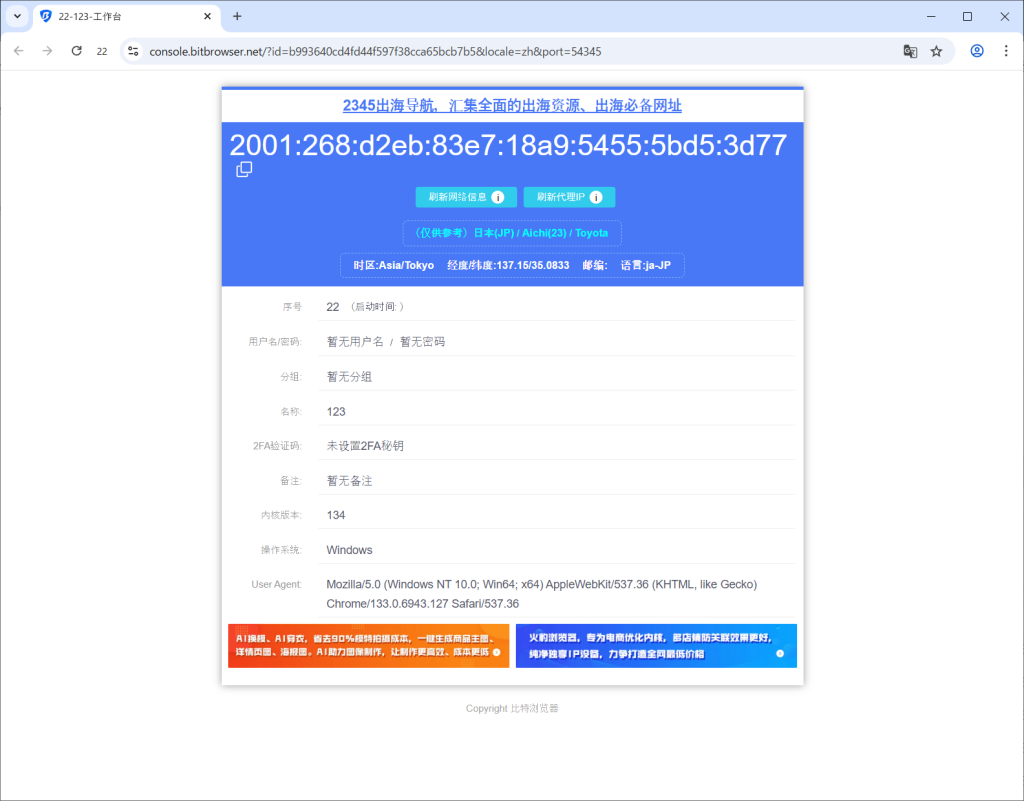
7.Verify the IP info inside the browser.
8.Test the IP on a checker site (e.g., ping0.cc) to ensure it is clean and high-quality.
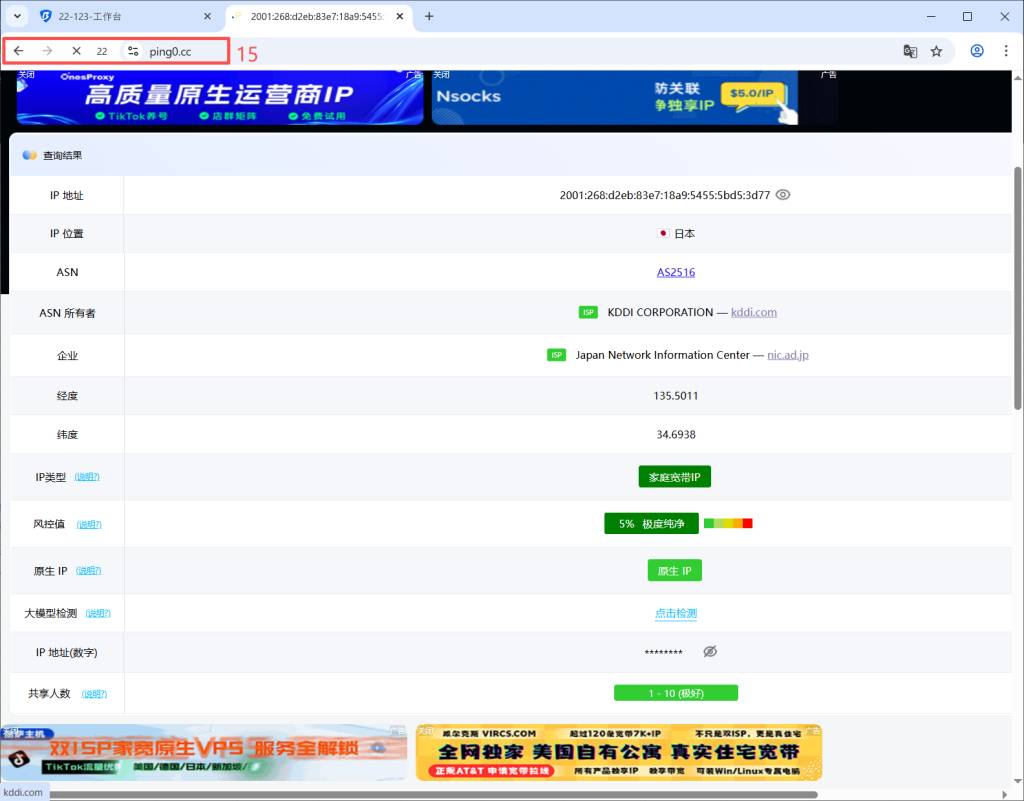
✅ The result shows a green, double-ISP, residential IP — safe for business operations.
Conclusion
In today’s complex digital environment, no single tool is sufficient.
- Bit Fingerprint Browser ensures multi-account safety through fingerprint isolation.
- Residential proxies provide realistic, stable network masking.
Together, they enhance account survival, operational stability, and efficiency for:
- Cross-border business operations
- Multi-region account management
- Data scraping and market research
For teams aiming at long-term global operations, this combination is no longer optional — it’s essential infrastructure.
Using a service like OKKProxy ensures stable, widely distributed residential IPs, paired with Bit Fingerprint Browser for secure, accurate, and fast operations, helping you gain a competitive edge.